Send Your Models Straight to a 3D Slicer
2026-09-17 · New Feature
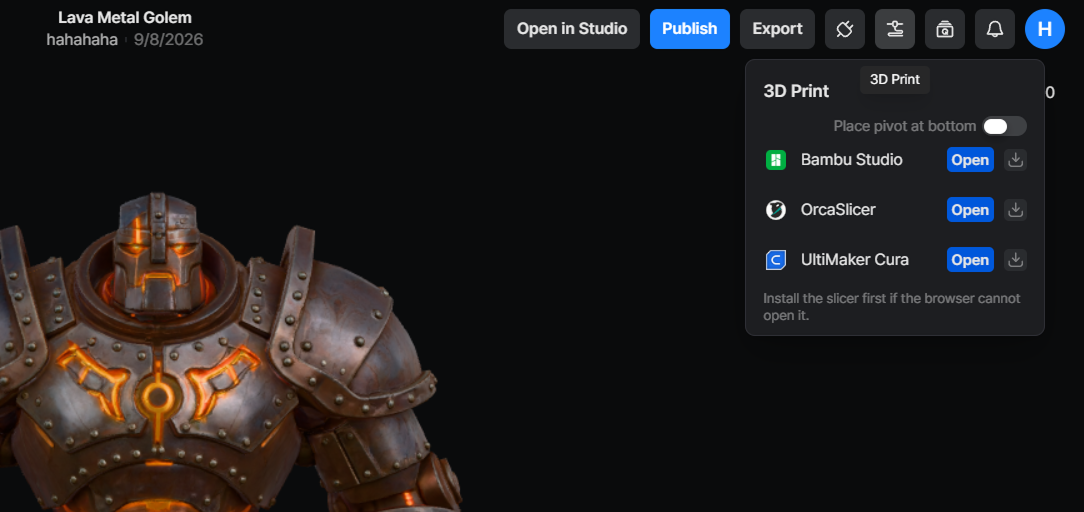 VARCO 3D now makes it easier to bring your finished models into your 3D printing workflow. Download an STL file directly, or open your model in a supported slicer from the new 3D Print panel.
What's New
- STL export — STL is now available alongside OBJ, FBX, and GLB in download menus.
- 3D Print panel — open your model directly in Bambu Studio, OrcaSlicer, or UltiMaker Cura.
- Slicer-ready formats — Models are sent to Bambu Studio as 3MF, and to OrcaSlicer and UltiMaker Cura as STL.
- Pivot to Bottom — place the model on the build plate before exporting or opening it in a slicer.
- Available across your workflow — use these options in 3D Studio, the My Assets viewer, Custom Workflow results, and the Custom Workflow Asset Library.
How to Use
- Open a finished 3D model.
- Click 3D Print.
- Choose whether to enable Pivot to Bottom.
- Select your slicer and click Open.
- Allow your browser to launch the slicer with the prepared model.
You can also choose STL from the regular download panel when you only need the file.
Good to Know
- Install the slicer before using Open.
- Your browser may ask for permission before launching the slicer application.