The Full 3D Pipeline, Connected
2026-07-27 · New Feature
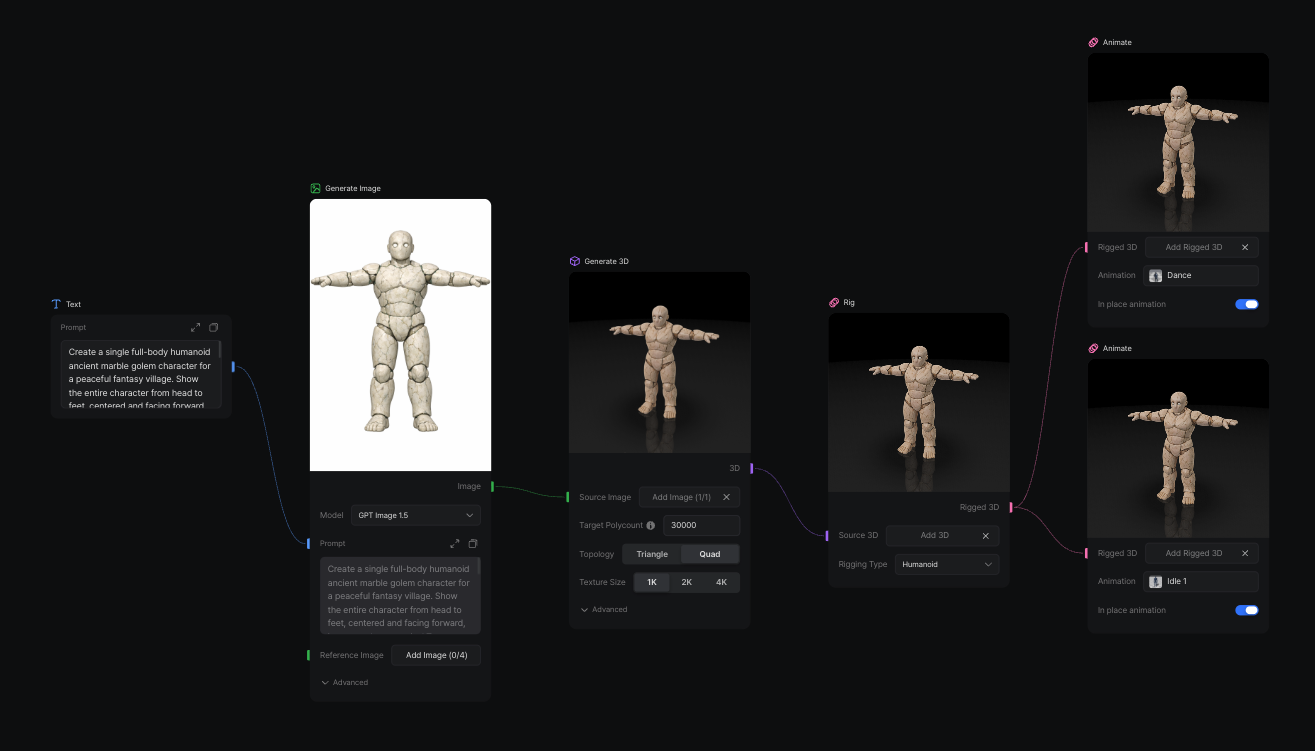
The last missing steps are here.
Rig and Animate nodes are now available in Custom Workflow, connecting asset generation all the way through to a character that is ready to move.
What's New
- Add a Rig node directly to your Custom Workflow.
- Follow it with an Animate node to apply motion to the rigged asset.
- Connect rigging and animation with the existing generation, remesh, texture, and export steps.
- Build and run the complete pipeline as one reusable workflow.
The Full Pipeline
A single Custom Workflow can now take an idea through the entire 3D asset pipeline:
Prompt or image → Generate 3D → Remesh → Texture → Rig → Animate → Export
What previously required separate tools and repeated handoffs can now run as one connected graph.
Built for MCP
This is where the pipeline becomes more than a node graph.
Connect VARCO 3D through MCP, describe the asset and workflow you want, and let your AI agent assemble and operate the pipeline for you.
That means an agent can help build the complete 3D asset pipeline behind a game—from the first prompt to an animated, downloadable result.
New to VARCO 3D MCP? Follow the setup guide for Codex or Claude to connect it with one prompt.
How to Use
- Open Custom Workflow.
- Add a Rig node after your 3D asset node.
- Connect an Animate node after Rig.
- Choose a motion and run the workflow.
Or connect VARCO 3D MCP and describe the pipeline in natural language.
The full pipeline is connected. Now it can run.