VARCO 3D 2.0
2026-07-01 · New Feature

What’s New
- The core generation model has been upgraded to VARCO 3D 2.0.
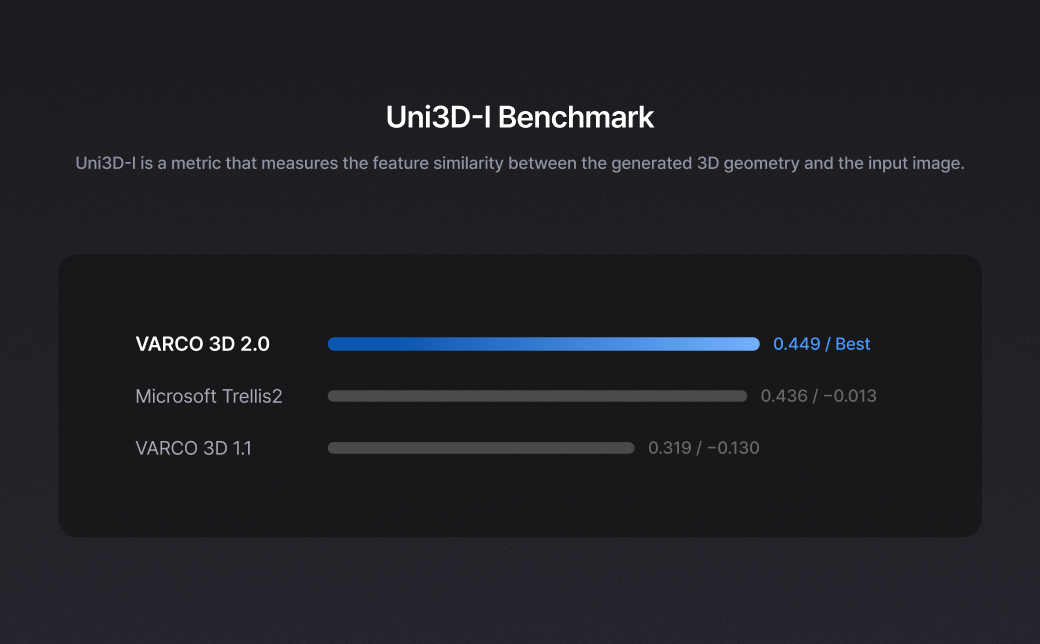
- VARCO 3D 2.0 records 0.449 on the Uni3D-I Benchmark, outperforming Trellis2 at 0.436.
- Mesh generation is now more stable, with cleaner overall structure and fewer unwanted artifacts.
- Shape fidelity has improved, helping generated assets better preserve the intent of the input image or prompt.
- Texture output is cleaner and more consistent across the asset.
- The improved base output also gives downstream workflows like Remesh, PBR, and 3D Studio editing a better starting point.
Why It Matters
- Higher benchmark performance on Uni3D-I
- Cleaner first results
- More reliable asset generation
- Better surface and texture consistency
- Less manual cleanup before editing, remeshing, or exporting
- A stronger base model for production-style 3D workflows
VARCO 3D 2.0 is an end-to-end model quality update: generate as usual, and start from a better result.
How to Use
- Generate a 3D asset as usual.
That’s it.
The updated model is already applied.
How to Check
- In 3D Studio, check the model name.
- If you see
varco-3d-2.0, you’re using the updated model.