Cut. Clean. Stick.
2026-06-11 · Improvements
Last time we said Click. Stick. Done. — now you can cut it, clean it, and it sticks like the real thing.
What's New
- True surface wrapping — stickers now follow the actual surface like a real decal. On folds, wrinkles, and curves, the image bends along the geometry instead of stretching or smearing. Size means real size, measured along the surface.
- Original sticker proportions — wide banners, tall labels, and non-square images keep their aspect ratio when you place and resize them on a model.
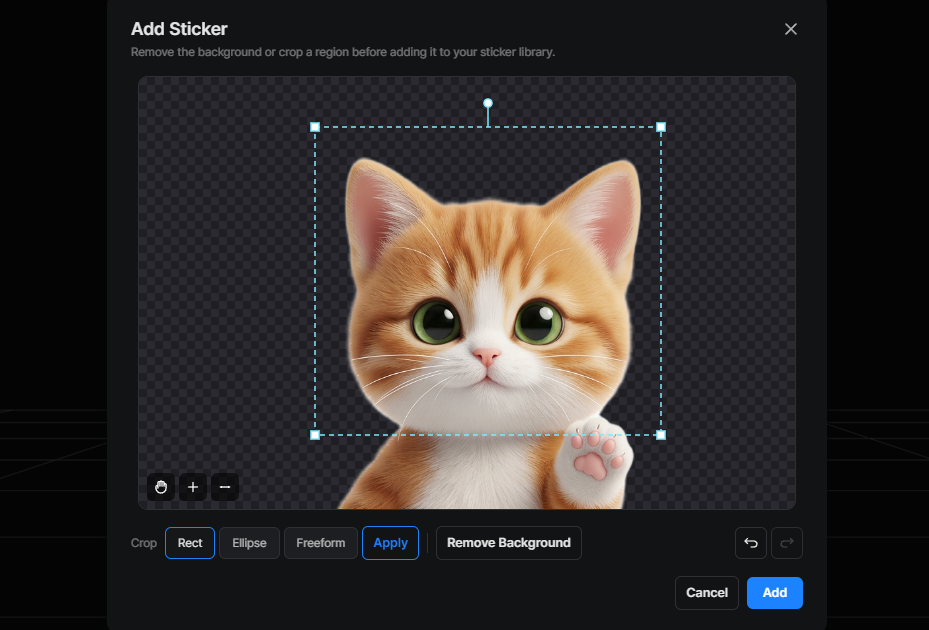
- A built-in sticker editor — uploading a sticker now opens an edit window before it joins your library. Remove the background with one click (AI-powered), or crop with rectangle, ellipse, and freeform selections — move, rotate, and resize the crop area until it's right.
- Edit any of your stickers, anytime — hover a sticker in your library and hit the pencil to reopen the editor. Edits are saved as a new sticker, so the original stays untouched.
- Finer placement control — drag a placed sticker by the exact point you grabbed, and nudge it with the arrow keys (hold Shift for bigger steps) for pixel-perfect positioning.
Why It Matters
- Wrinkled flags, curved mugs, armor plates — surfaces that used to tear or stretch a sticker now wear it cleanly.
- Rectangular logos and labels no longer get squeezed into a square.
- No more bleed-through: a sticker on the outside of a mug stays on the outside.
- No external image editor needed — trim, isolate, and clean up your sticker right where you upload it.
- Originals are never overwritten. Make five variants of one logo and keep them all.
How to Use
- Open 3D Studio and enter Texture Paint & Sticker
- Hit Add Sticker and pick an image — the editor opens
- Remove the background or crop the region you want, then Add
- Click on the model to place it, drag or nudge with arrow keys to fine-tune
- Hit Apply Changes when you're happy
Good to Know
- In the editor: mouse wheel zooms, wheel-drag (or the hand tool) pans, and Ctrl/Cmd + Z / Shift + Z undoes and redoes your edits.
- Crop selections can be moved, rotated, and resized by their handles before you commit.
- On the model, a selected sticker moves with the arrow keys too — tap to nudge, hold Shift for bigger steps.
- Background removal runs on our servers and takes a few seconds — no credits required.
- Placement got noticeably smoother on heavy models, and applying a sticker is faster too.
- Uploaded images: PNG / JPG / WebP, up to 10 MB. Desktop only.
Cut it your way. Clean it in a click. It sticks for real.